Fill Vacant Units Faster with Application Pre-Fill
Turn your waitlist into a pipeline of prepared applicants.
Don't let a pending application stall your leasing process. Interested renters can complete and save application information while a unit is held, then pick up where they left off if it becomes available—or transfer their information to another available unit.
- Pre-fill applications while a unit is held
- Save progress and return anytime
- Resume when a unit becomes available
- Transfer to another available unit
- Application links by email and text
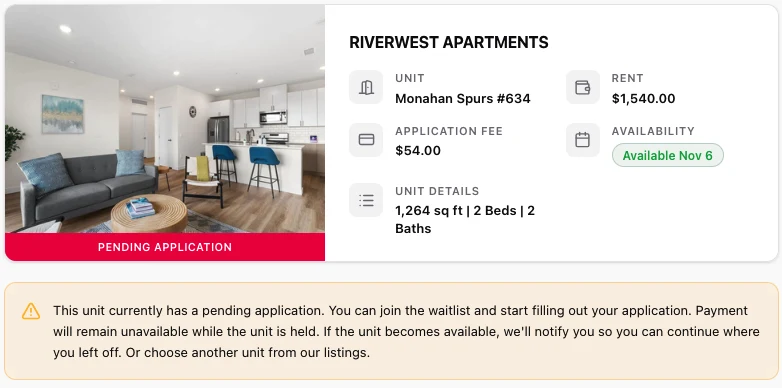
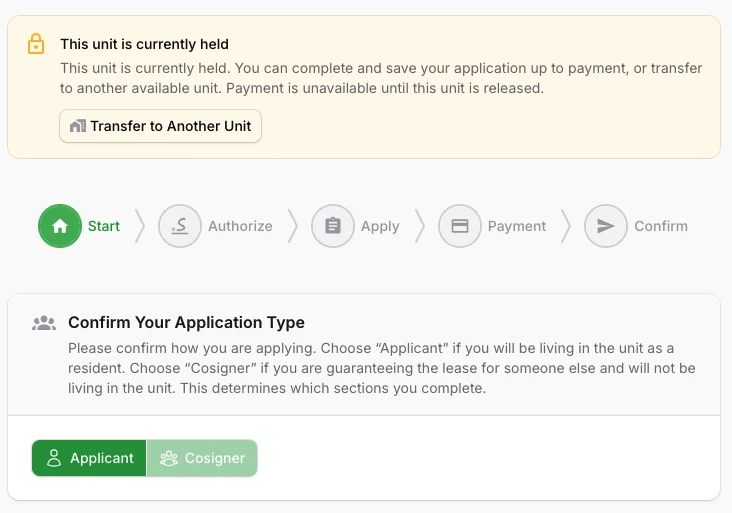
Product screenshots from Online Application 2026. Sample data.
Every day a unit sits vacant matters
If the first application group is denied or doesn't lease, the next interested renter has usually had to start from scratch: begin the forms, add applicants and cosigners, wait on information, then pay before screening can begin. Pre-fill lets that work happen while the unit is still held.
Keep the next applicant ready
Interested renters can complete their information ahead of time. If the unit becomes available, they pick up where they left off instead of starting a new application.
Avoid repeated data entry
Unpaid application information can transfer to another available unit under the same management company, so applicants don't re-enter what they've already provided.
Reduce leasing coordination
Application links go out by email and SMS. When a unit is released through the existing Did Not Lease workflow, waitlist notifications bring renters back to their saved work.
Waitlisted applicants, ready the moment a unit becomes available
-
Join the waitlist and keep moving
A pending application no longer ends the conversation. The listing explains the unit's status and invites renters to start their application now.
-
Save progress while held
Applicants and cosigners can work through Start, Authorize and Apply. Progress saves as they go; Payment opens only when the unit is available.
-
Transfer to another unit
From the held-unit banner, applicants can move an unpaid application to another available unit managed by the same management company. The transfer doesn't reserve the new unit.
-
Resume when available
The waitlist notification links back to the existing saved application. Applicants complete what's left and pay if the unit is still available; screening follows the normal process.
Better for applicants. Better for property managers.
Applicants keep their progress. Property managers keep their momentum.
- Continue an application even when another group holds the unit
- Save work and return anytime without losing progress
- Receive the application link by email and text
- See clearly whether a unit is held or available
- Transfer unpaid information to another available unit
Ready to spend less time waiting on applications?
Keep interested renters moving, even while a unit is held. Give your leasing team a pipeline of better-prepared applicants and a quicker path to the next screening opportunity.